Save 8+ Hours Per Client on Cost Allocation Every Month

CostAllocation Pro gives accounting firms a single platform to automate payroll and expense allocations for all your QuickBooks Online clients — with multi-company support built in.

CAP Nonprofit

JD

Dashboard

Payroll Allocations

Employee Costs

Time Activity

Cost Allocations

Expense Allocations

Reports

Settings

Cost Allocation

Journal Entries

Preview Journal

Export

Maximize

07/01/2026 - 07/31/2026

Search Here

Employees

Customers

Classes

Employee Name

First, Hugo

Total

Twishes, Bes %

Total

Customer Name

Public Health Workforce Contract - #124578

Big Grant

1-General Operating

1-General Operating

Public Health Workforce Contract - #124578

Big Grant

1-General Operating

1-General Operating

Class Name

1-Programs:102-Street Outreach Program

3 - Admin

3 - Admin

3 - Admin

1-Programs:102-Street Outreach Program

3 - Admin

3 - Admin

3 - Admin

Total Hours

13:00

29:00

36:00

36:00

-

-

-

36:00

Allocation %

16.67%

37.18%

46.15%

46.15%

33%

50%

22%

46.15%

Gross Earnings

$495.23

$1,104.52

$1,371.01

$2,970.76

$712.17

$1,079.04

$474.78

$2,158.08

Total Salary

$495.23

$1,104.52

$1,371.01

$2,970.76

$712.17

$1,079.04

$474.78

$2,158.08

CAP Nonprofit

JD

Dashboard

Payroll Allocations

Employee Costs

Time Activity

Cost Allocations

Expense Allocations

Reports

Settings

Cost Allocation

Journal Entries

Preview Journal

Export

Maximize

07/01/2026 - 07/31/2026

Search Here

Employees

Customers

Classes

Employee Name

First, Hugo

Total

Twishes, Bes %

Total

Customer Name

Public Health Workforce Contract - #124578

Big Grant

1-General Operating

1-General Operating

Public Health Workforce Contract - #124578

Big Grant

1-General Operating

1-General Operating

Class Name

1-Programs:102-Street Outreach Program

3 - Admin

3 - Admin

3 - Admin

1-Programs:102-Street Outreach Program

3 - Admin

3 - Admin

3 - Admin

Total Hours

13:00

29:00

36:00

36:00

-

-

-

36:00

Allocation %

16.67%

37.18%

46.15%

46.15%

33%

50%

22%

46.15%

Gross Earnings

$495.23

$1,104.52

$1,371.01

$2,970.76

$712.17

$1,079.04

$474.78

$2,158.08

Total Salary

$495.23

$1,104.52

$1,371.01

$2,970.76

$712.17

$1,079.04

$474.78

$2,158.08

How it works

Running monthly cost allocations for multiple clients means your staff is buried in repetitive journal entry work that should take minutes, not days.

Every client has different allocation rules, payroll processors, and QuickBooks setups — making it nearly impossible to standardize your process.

Multi-Company Support

Manage cost allocations for all your QuickBooks Online clients from a single CostAllocation Pro account. Switch between companies instantly without re-authenticating.

Class

1 - Programs

101 - Community Service

102 - Outreach

2 - Fundraising

3 - Admin

301 - Indirect Cost Pool

302 - Indirect Expenses

Custom GL Mapping Per Client

Custom GL Mapping Per Client Configure unique GL account mappings, allocation rules, and cost pools for each client. CAP remembers every client's setup so your team can run allocations in minutes.

Indirect Cost Rate
10%
Fringe Benefit Rate
15%
Overhead Cost Rate
8.5%

Any Payroll Processor

Whether your clients use ADP, Gusto, Paychex, or a regional processor, CAP accepts CSV imports from any payroll system — no custom integrations needed.

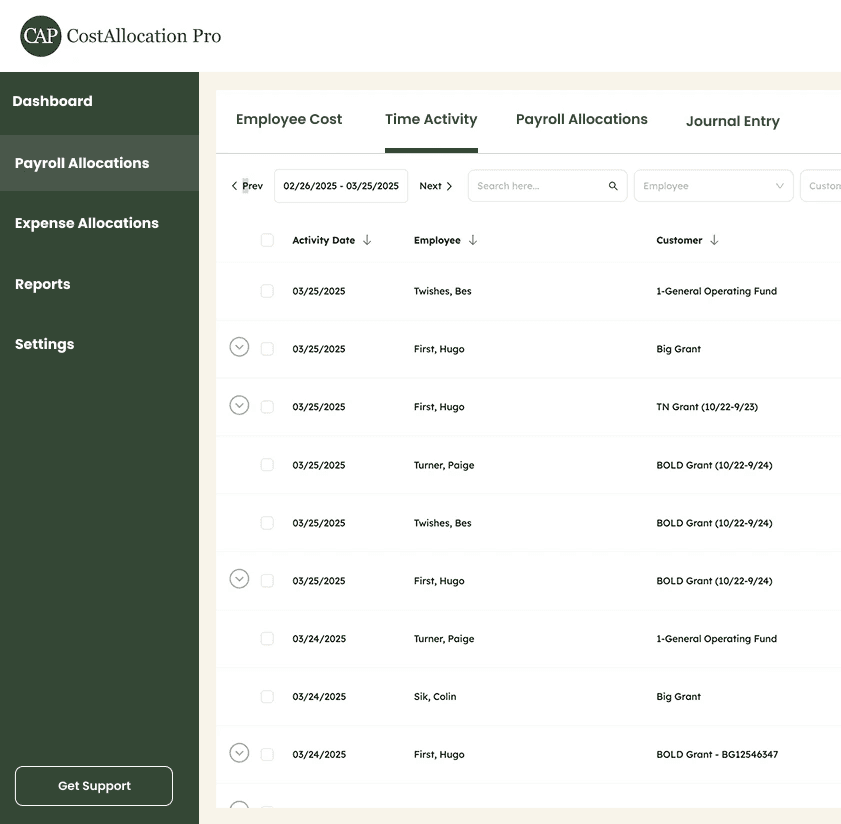
Interface image
Interface panel
Example image

Save Time

Stop living in spreadsheets

Every client has different allocation rules, payroll processors, and QuickBooks setups — making it nearly impossible to standardize your process.

Example image

Save Time

Stop living in spreadsheets

Every client has different allocation rules, payroll processors, and QuickBooks setups — making it nearly impossible to standardize your process.

Example image

Save Time

Stop living in spreadsheets

Every client has different allocation rules, payroll processors, and QuickBooks setups — making it nearly impossible to standardize your process.

automate

One-Click Journal Entry Publishing

Review allocations, then publish the journal entry directly to the client's QuickBooks Online with a single click. Full audit trail included.

automate

One-Click Journal Entry Publishing

Review allocations, then publish the journal entry directly to the client's QuickBooks Online with a single click. Full audit trail included.

automate

One-Click Journal Entry Publishing

Review allocations, then publish the journal entry directly to the client's QuickBooks Online with a single click. Full audit trail included.

Our product is used by

  • Kevin Wallace, CPA P.C.

Our product is used by

  • Kevin Wallace, CPA P.C.

Our product is used by

  • Kevin Wallace, CPA P.C.

FAQ

Any Questions?

Any Questions?

Can one CAP account manage multiple client QuickBooks companies?

Yes. CostAllocation Pro's multi-company selector lets you manage and switch between all your clients' QuickBooks Online accounts from a single login.

Can we standardize our allocation workflow across clients with different setups?

Yes. Each client has its own saved configuration — GL mappings, allocation rules, cost pools — so your team follows the same process every month regardless of client differences.

Is there volume or per-client pricing for firms?

Our subscription is $50/month per QBO company. If you have more than 5 clients you'd like to get set up, reach out to us for a bulk pricing discount.

Pricing

Monthly

Yearly

Save 20%

Standard

Essential finance tools for budgeting and expense tracking.

$50

$40

/month

Automate Journal Entries

Import Employee Costs from any Payroll Processor

Company Selector for Multiple QuickBooks Online accounts

Email Support

Monthly

Yearly

Save 20%

Standard

Essential finance tools for budgeting and expense tracking.

$50

$40

/month

Automate Journal Entries

Import Employee Costs from any Payroll Processor

Company Selector for Multiple QuickBooks Online accounts

Email Support

Newsletter

Newsletter

Subscribe

Subscribe

Subscribe to our newsletter to stay in the know about all of our latest updates and enhancements.

Subscribe to our newsletter to stay in the know about all of our latest updates and enhancements.