nonprofits
There's a Better Way to Handle Nonprofit Expense Allocations
Your team is talented, mission-driven, and stuck rebuilding the same allocation spreadsheet every month. CostAllocation Pro automates the whole process, integrating directly with QuickBooks Online — so your numbers are consistent, your audits go smoothly, and your team gets their time back.
Trusted by




nonprofits
Why Nonprofit Finance Teams Are Moving Away from Spreadsheets
We hear this a lot: the spreadsheet works — until it doesn't. For many nonprofits, expense allocation lives in a shared Excel file that one person really understands, built on a methodology that's slightly different every month depending on who ran it. That inconsistency is one of the issues federal auditors look at under 2 CFR 200. Federal auditors aren't just checking your numbers — they're checking whether your methodology is applied the same way across every award, every month. When it isn't, that inconsistency can contribute to audit findings. CostAllocation Pro gives your team one consistent, automated process so the methodology is the same every single month — no matter who runs it.
Powerful Features. Built To Save Time.
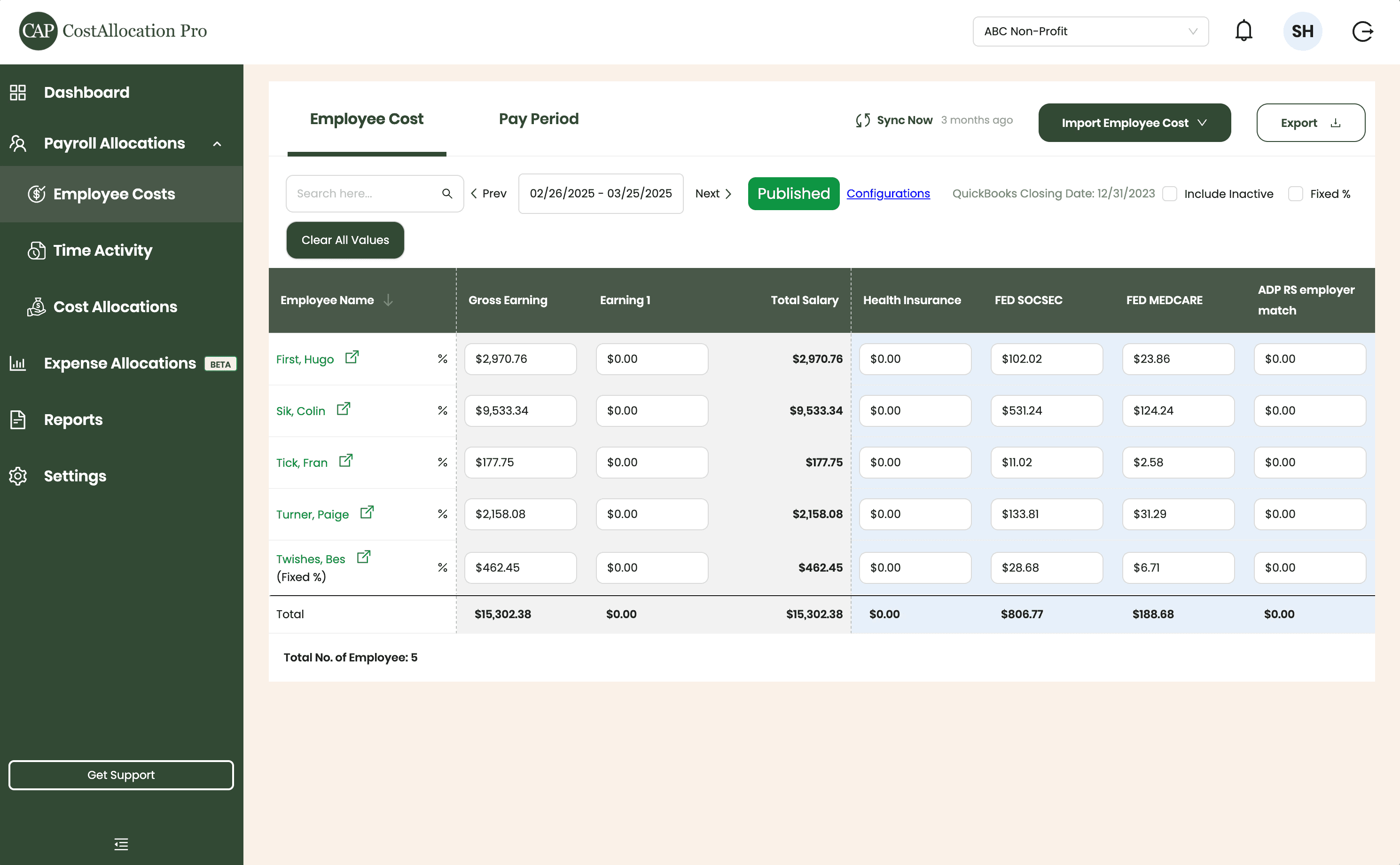
Employee Costs
Easily upload employee cost data from any payroll provider. Just import a .csv file from your payroll report, and we’ll handle the rest.
First, Hugo
$2,970.76
$350.00
$102.02
$23.86
Sik, Colin
$9,533.34
$450.00
$531.24
$124.24
Tick, Fran
$177.75
$500.00
$11.02
$2.58
Turner, Paige
2,158.08
$250.00
$133.81
$31.29
Twishes, Bes
$462.45
$175.00
$28.68
$6.71
Employee Name
Gross Salary
Health Insurance
Social Security
Medicare
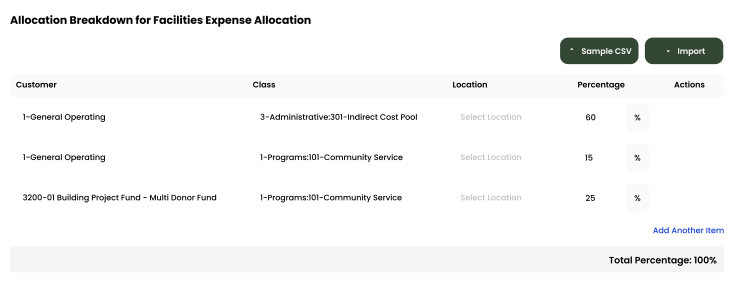
Expense Allocations
Apply your predefined allocation percentages and post to QuickBooks with a single click.
Time Activity
Sync employee time directly from QuickBooks, or import a .csv from any time-tracking system—whichever works best for you.
Employee
Customer
Hours
Turner, Paige
1-General Operating Fund
1:00
Twishes, Bes
GOLD Grant-BG12546347
8:00
First, Hugo
Big Grant
8:00
First, Hugo
Big Grant
4:00
First, Hugo
TN Grant (10/22-9/23)
2:00
Twishes, Bes
Public Health Workforce
Contract-#124578
6:00
Turner, Paige
1-General Operating Fund
1:00
Download Attachments
Filter and select transactions, export their attachments, and download everything neatly organized by vendor—no extra sorting required.
Automate Journal Entries
Import your employee time and CostAllocation Pro automatically calculates payroll allocations, creates the journal entry, and lets you publish directly to QuickBooks Online.

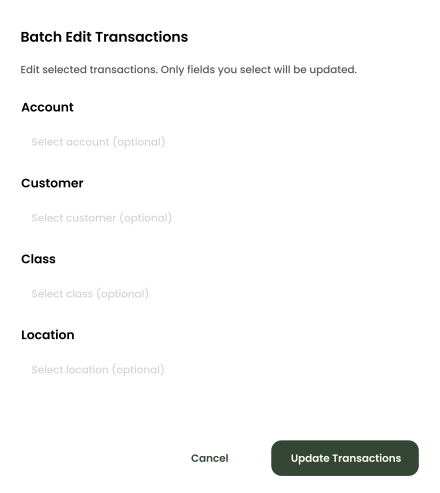
Batch Edit
Use custom filters to quickly find the transactions you need. Select any group of entries to reclassify accounts, customers, classes, or locations—and your updates sync instantly to QuickBooks Online.
nonprofits
Automated Allocations That Work the Way You Already Do
CostAllocation Pro connects directly to your QuickBooks Online account and automates your expense allocation methodology across programs, grants, and cost centers. You set up your allocation bases once — headcount, square footage, direct costs, or a custom rate — and the software handles the rest. No manual entry, no formula errors, no frantic month-end reconciliation. Your controller defines the methodology once; the software handles the rest. And because everything lives inside QuickBooks Online, your program expenses, indirect costs, and grant expenditures are recorded together in QuickBooks Online.
Consistent Methodology, Every Month
Define your allocation bases once. CostAllocation Pro applies the same methodology automatically every month — so your numbers are consistent whether your controller runs it or someone covers for them.
Documentation Built Into the Process
Every allocation run is logged and traceable inside QuickBooks Online. When an auditor asks how shared costs were allocated, your team has a clear, organized answer — not a folder of spreadsheet versions.
Close Faster, Stress Less
Eliminate the manual allocation worksheet from your month-end close. What used to take days of reconciliation now takes a review and an approval.
nonprofits
Better Positioned for Audits — Without the Month-End Scramble
One of the things nonprofit finance teams tell us most often is that they spend the last week of every month just getting ready to close — chasing allocations, checking formulas, reconciling variances. With CostAllocation Pro, that work happens automatically. Every allocation run is consistent and traceable. Your indirect cost methodology is applied consistently each run, based on the rules you've configured. When an auditor asks how shared costs were allocated across your federal awards, the answer isn't a spreadsheet with five versions saved on a shared drive — it's a clean, documented process that your team can walk through confidently in minutes.
Manual allocation spreadsheets create audit risk and consume days of staff time that your nonprofit simply can't afford to lose every month-end.
See how nonprofits like yours are automating expense allocations inside QuickBooks Online — and getting their month-end close back.
nonprofits
Choose the best Plan that suites you
Monthly
Yearly
Save 20%

Standard
Essential finance tools for budgeting and expense tracking.
$50
$40
/month
Automate Journal Entries
Import Employee Costs from any Payroll Processor
Company Selector for Multiple QuickBooks Online accounts
Email Support
nonprofits
Common questions with Clear answers
Does CostAllocation Pro work with our existing QuickBooks Online setup?
Yes — CostAllocation Pro connects directly to QuickBooks Online and works with your existing chart of accounts, customers, classes, and locations. There's no data migration and no parallel system to maintain. Your team keeps working in QuickBooks the way they always have, and the allocations just happen automatically in the background.
Will this support our 2 CFR 200 documentation requirements?
CostAllocation Pro helps you build a consistent, documented allocation methodology — which is what federal auditors look for under Uniform Guidance. When your allocation basis is applied the same way every month, you reduce the inconsistency that can lead to audit findings. Think of it as building documentation into your process rather than scrambling to reconstruct it after the fact.
How quickly can we get up and running?
Most nonprofits complete initial setup within a few hours.You connect your QuickBooks Online account, define your allocation methodology and bases, and run your first allocation. Most teams complete their first automated month-end close in the same month they sign up — and wonder why they waited so long.