nonprofits
Rate-Based Payroll Allocations That Actually Work in QuickBooks Online
Applying indirect cost rates and fringe benefit rates to payroll shouldn't require a separate spreadsheet, a manual calculation, and a prayer that the math is right. CostAllocation Pro automates rate-based payroll allocations directly inside QuickBooks Online — accurately, consistently, every month.
Trusted by




nonprofits
The Challenge of Rate-Based Allocations for Nonprofit Payroll
Nonprofits with federally negotiated indirect cost rates face a specific challenge: applying those rates correctly to payroll charges across multiple grants and programs, every month, in a way that satisfies both your auditors and your program officers. The math isn't complicated — but doing it manually in a spreadsheet, for every employee, across every grant, every month, is time-consuming and error-prone. One transposed number or one month where the rate was applied inconsistently is enough to create a compliance issue. And when your indirect cost rate is negotiated with a federal agency, the stakes for getting it right are higher than most.
Powerful Features. Built To Save Time.
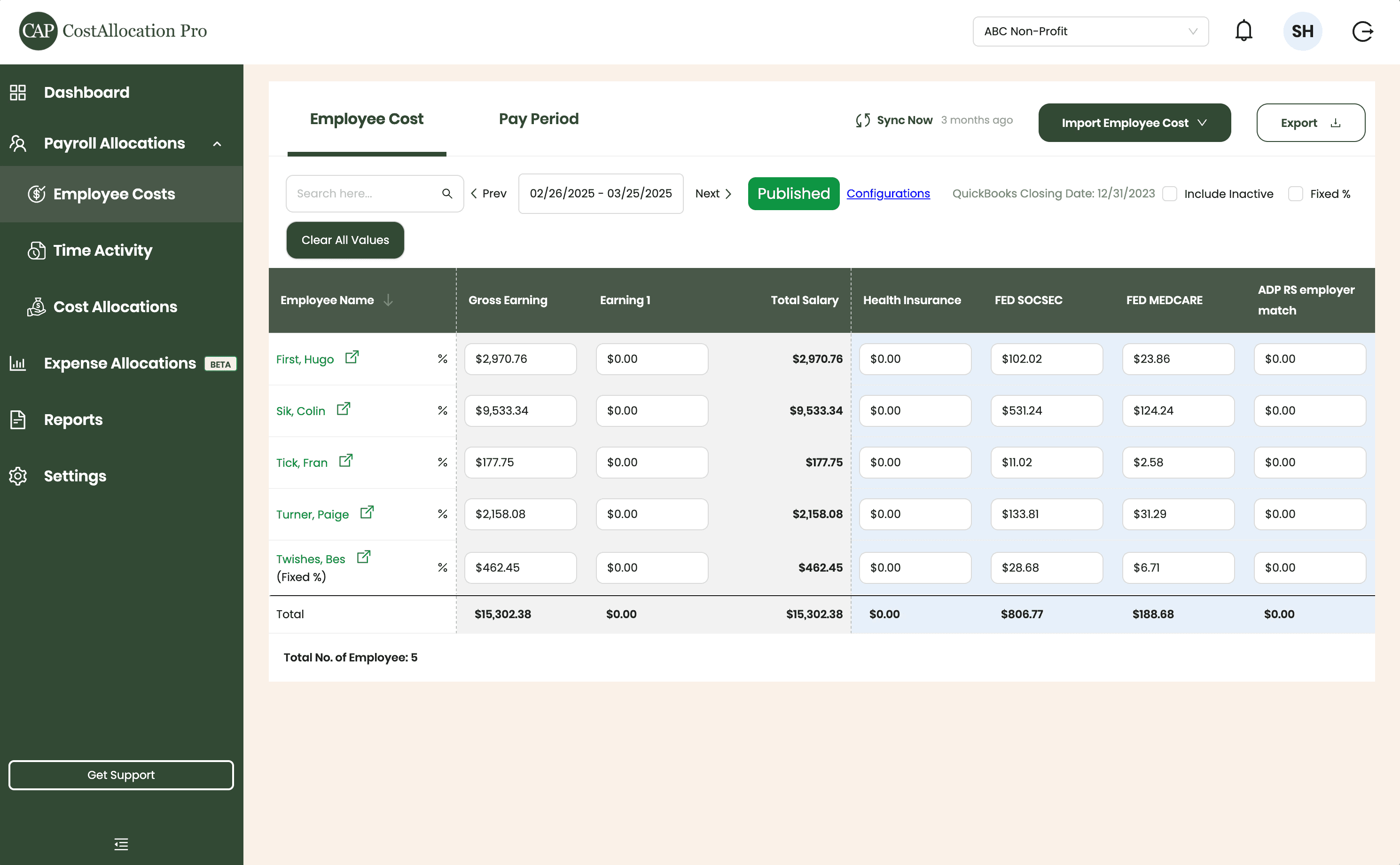
Employee Costs
Easily upload employee cost data from any payroll provider. Just import a .csv file from your payroll report, and we’ll handle the rest.
First, Hugo
$2,970.76
$350.00
$102.02
$23.86
Sik, Colin
$9,533.34
$450.00
$531.24
$124.24
Tick, Fran
$177.75
$500.00
$11.02
$2.58
Turner, Paige
2,158.08
$250.00
$133.81
$31.29
Twishes, Bes
$462.45
$175.00
$28.68
$6.71
Employee Name
Gross Salary
Health Insurance
Social Security
Medicare
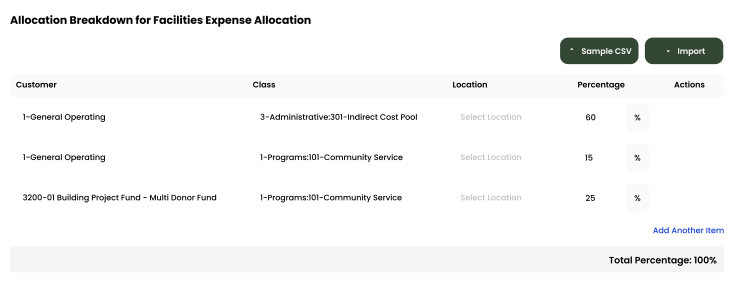
Expense Allocations
Apply your predefined allocation percentages and post to QuickBooks with a single click.
Time Activity
Sync employee time directly from QuickBooks, or import a .csv from any time-tracking system—whichever works best for you.
Employee
Customer
Hours
Turner, Paige
1-General Operating Fund
1:00
Twishes, Bes
GOLD Grant-BG12546347
8:00
First, Hugo
Big Grant
8:00
First, Hugo
Big Grant
4:00
First, Hugo
TN Grant (10/22-9/23)
2:00
Twishes, Bes
Public Health Workforce
Contract-#124578
6:00
Turner, Paige
1-General Operating Fund
1:00
Download Attachments
Filter and select transactions, export their attachments, and download everything neatly organized by vendor—no extra sorting required.
Automate Journal Entries
Import your employee time and CostAllocation Pro automatically calculates payroll allocations, creates the journal entry, and lets you publish directly to QuickBooks Online.

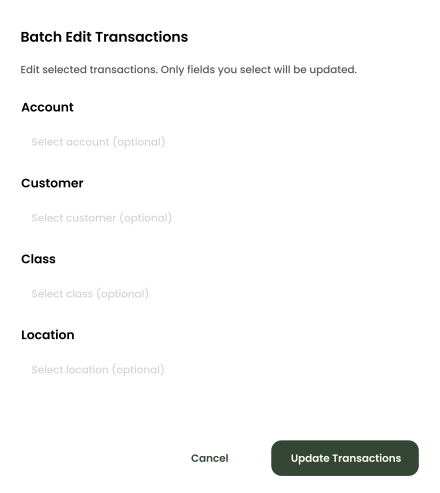
Batch Edit
Use custom filters to quickly find the transactions you need. Select any group of entries to reclassify accounts, customers, classes, or locations—and your updates sync instantly to QuickBooks Online.
nonprofits
How CostAllocation Pro Applies Rates to Nonprofit Payroll
CostAllocation Pro lets you apply your indirect cost rate, fringe benefit rate, and other rate-based allocation methodology to your payroll allocation. Whether you're working with a simplified allocation rate or a negotiated indirect cost rate agreement, the software handles the calculation and posts the results to QuickBooks Online. No spreadsheet. No manual calculation. No month-end scramble to make sure every grant got the right rate applied correctly.
Apply Indirect Cost Rates Without Manual Calculation
Define your negotiated indirect cost rate and fringe benefit rates once. CostAllocation Pro applies them to payroll automatically every period — no spreadsheet formulas, no manual math.
Rate Changes Handled Cleanly
When your indirect cost rate changes, update it once in CostAllocation Pro. The new rate applies going forward. Historical periods stay unchanged, giving you a clean record across rate changes.
Documented Rate Application, Period by Period
Every rate application is automatic and traceable. When your cognizant federal agency asks how your indirect cost rate was applied, your team has a clear, organized answer.
nonprofits
Defending Your Indirect Cost Rate With Clean Documentation
One of the questions nonprofits dread most in an audit is being asked to show how their indirect cost rate was applied. With a manual spreadsheet process, that answer involves pulling multiple files, explaining methodology verbally, and hoping the auditor is satisfied. With CostAllocation Pro, the answer is simple: every rate application is consistent and traceable directly in QuickBooks Online. Your methodology is applied the same way every month. Your indirect cost documentation is clean. And your next rate negotiation with your cognizant federal agency is supported by a consistent track record rather than a patchwork of spreadsheets.
Applying indirect cost rates manually to nonprofit payroll every month creates unnecessary risk — and takes far more time than it should.
See how nonprofits are automating rate-based payroll allocations inside QuickBooks Online and simplifying their indirect cost documentation.
nonprofits
Choose the best Plan that suites you
Monthly
Yearly
Save 20%

Standard
Essential finance tools for budgeting and expense tracking.
$50
$40
/month
Automate Journal Entries
Import Employee Costs from any Payroll Processor
Company Selector for Multiple QuickBooks Online accounts
Email Support
nonprofits
Common questions with Clear answers
Does CostAllocation Pro work with our existing QuickBooks Online setup?
Yes — CostAllocation Pro connects directly to QuickBooks Online and works with your existing chart of accounts, customers, classes, and locations. There's no data migration and no parallel system to maintain. Your team keeps working in QuickBooks the way they always have, and the allocations just happen automatically in the background.
What if our negotiated indirect cost rate changes?
Updating your rate in CostAllocation Pro takes about two seconds. You enter the new rate, and the software applies the updated rate going forward while preserving the historical rate for prior periods. Your audit trail stays clean and accurate across rate changes.
How quickly can we get up and running?
Most nonprofits complete initial setup within a few hours.You connect your QuickBooks Online account, define your allocation methodology and bases, and run your first allocation. Most teams complete their first automated month-end close in the same month they sign up — and wonder why they waited so long.