construction companies
Allocate Construction Labor Costs and Burden Rates to the Right Jobs — Automatically
Labor is your largest job cost. Getting it allocated correctly — with the right burden rates applied — across every project every pay period is one of the most time-consuming parts of construction accounting. CostAllocation Pro automates labor and burden allocation inside QuickBooks Online so your job costing reflects true labor costs, not approximations.
Trusted by




construction companies
The Challenge of Labor Burden Allocation Across Construction Jobs
On a construction project, workers move between jobs throughout the week. A crew might split time between two active sites on the same day. Supervisors oversee multiple projects simultaneously. Equipment operators log hours on different machines across different jobs. Capturing all of that and making sure labor dollars — with the correct burden rates for workers' comp, payroll taxes, and benefits — land on the right jobs is genuinely complex when done manually. Most construction companies handle it with a combination of timesheets, spreadsheet calculations, and journal entries that consume significant accounting time every pay period. When the process is rushed, labor costs get allocated inaccurately, and your job margins don't reflect true labor cost.
Powerful Features. Built To Save Time.
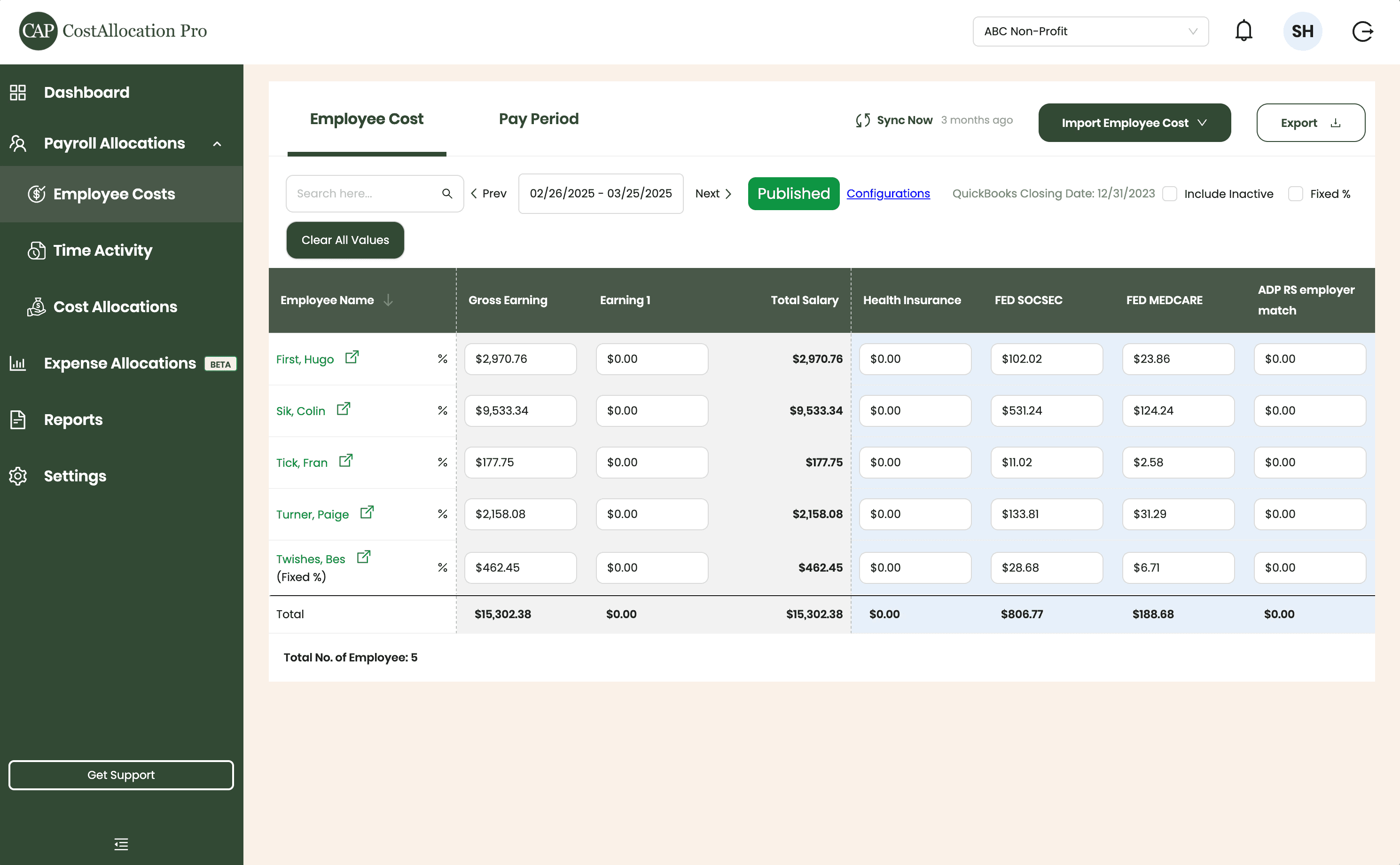
Employee Costs
Easily upload employee cost data from any payroll provider. Just import a .csv file from your payroll report, and we’ll handle the rest.
First, Hugo
$2,970.76
$350.00
$102.02
$23.86
Sik, Colin
$9,533.34
$450.00
$531.24
$124.24
Tick, Fran
$177.75
$500.00
$11.02
$2.58
Turner, Paige
2,158.08
$250.00
$133.81
$31.29
Twishes, Bes
$462.45
$175.00
$28.68
$6.71
Employee Name
Gross Salary
Health Insurance
Social Security
Medicare
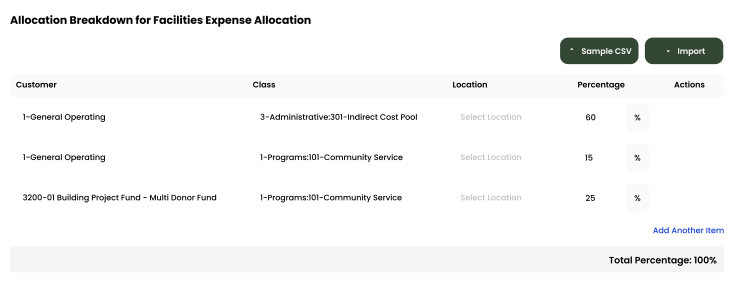
Expense Allocations
Apply your predefined allocation percentages and post to QuickBooks with a single click.
Time Activity
Sync employee time directly from QuickBooks, or import a .csv from any time-tracking system—whichever works best for you.
Employee
Customer
Hours
Turner, Paige
1-General Operating Fund
1:00
Twishes, Bes
GOLD Grant-BG12546347
8:00
First, Hugo
Big Grant
8:00
First, Hugo
Big Grant
4:00
First, Hugo
TN Grant (10/22-9/23)
2:00
Twishes, Bes
Public Health Workforce
Contract-#124578
6:00
Turner, Paige
1-General Operating Fund
1:00
Download Attachments
Filter and select transactions, export their attachments, and download everything neatly organized by vendor—no extra sorting required.
Automate Journal Entries
Import your employee time and CostAllocation Pro automatically calculates payroll allocations, creates the journal entry, and lets you publish directly to QuickBooks Online.

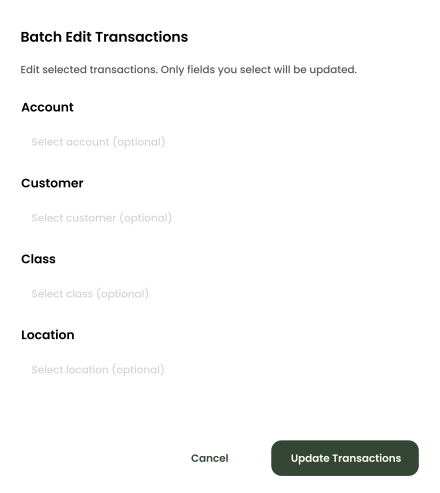
Batch Edit
Use custom filters to quickly find the transactions you need. Select any group of entries to reclassify accounts, customers, classes, or locations—and your updates sync instantly to QuickBooks Online.
construction companies
Labor Costs and Burden Rates Applied Automatically to Every Job
CostAllocation Pro connects to your QuickBooks Online account and automates labor cost allocation across jobs based on your defined methodology. Labor dollars follow the hours your team logged on each job. Burden rates — workers' compensation, payroll taxes, benefits — are applied at the correct rates for each employee category and posted to the right jobs automatically. Supervisors' salaries can be allocated across the jobs they oversee by a defined basis. The result is accurate, consistent labor cost data on every job, every pay period — without manual journal entries or separate burden rate calculations.
True Labor Costs on the Right Jobs Every Pay Period
Define how labor flows across jobs once. CostAllocation Pro applies your methodology automatically every pay period — burden rates for each employee category included — without manual journal entries.
Burden Rates Applied at the Right Level
Workers' comp, payroll taxes, benefits — applied automatically at the correct rates for each employee category and posted to the right jobs. No manual burden calculation, no allocation errors.
Better Bid Data From Consistent Historical Labor Costs
When labor and burden are allocated the same way across every job, your historical cost data becomes a reliable benchmark for future estimates. Know what labor truly costs on each project type.
construction companies
True Labor Cost Data That Improves Project Decisions and Future Bids
Accurate labor burden allocation does more than clean up your books. When project managers can see true labor costs — including all burden — on each job throughout the month, they can make better decisions about crew deployment, overtime management, and job profitability in real time. When estimators can look back at historical jobs and see that labor and burden were allocated consistently, they can build more accurate labor budgets into future bids. Contractors who track actual costs against estimates in real time achieve meaningfully better margins than those who wait until project closeout. CostAllocation Pro delivers that visibility without adding complexity to the QuickBooks workflow your team already uses.
Manual labor and burden rate allocation across construction jobs produces inaccurate job costing data and consumes accounting staff hours that should be spent on higher-value work.
See how construction companies are automating labor and burden rate allocation across jobs inside QuickBooks Online and getting cost data they can trust.
construction companies
Choose the best Plan that suites you
Monthly
Yearly
Save 20%

Standard
Essential finance tools for budgeting and expense tracking.
$50
$40
/month
Automate Journal Entries
Import Employee Costs from any Payroll Processor
Company Selector for Multiple QuickBooks Online accounts
Email Support
construction companies
Common questions with Clear answers
How does CostAllocation Pro handle workers who split time across multiple jobs in the same pay period?
CostAllocation Pro allocates labor costs based on time data and the allocation rules you define. For workers who split time across jobs, you define the methodology — by timesheet hours or percentage — and the software applies it consistently every pay period.
Can we apply different burden rates to different employee categories?
Yes. CostAllocation Pro let's you choose your methodology for each employee, and the software applies the correct rate to each employee's labor allocation automatically.
Does this integrate with our timekeeping system?
CostAllocation Pro works with payroll and labor data from any system. You just generate a CSV report from your system and upload it into CostAllocation Pro.