construction companies
Know Exactly Which Job Every Overhead Dollar Belongs To
Construction runs on thin margins. When shared costs — equipment, supervision, insurance, yard expenses — aren't allocated to the right jobs, your job costing is wrong. CostAllocation Pro automates job cost allocation for QuickBooks Online so every dollar lands on the right project, every month.
Trusted by




construction companies
Why Spreadsheet Job Costing Breaks Down as You Grow
Most contractors start with a workable approach to job costing — a spreadsheet, a rough overhead percentage, someone who knows the formula. It holds together until the job count grows, the crew changes, or the person running the numbers leaves. Suddenly the overhead allocation on the downtown renovation looks nothing like last quarter's, and your project managers are questioning why their job margins shifted. The problem isn't the math — it's that manual job costing processes don't scale. When your cost data depends on a spreadsheet rebuilt every month, you don't really know if you made or lost money on a job until long after project closeout.
Powerful Features. Built To Save Time.
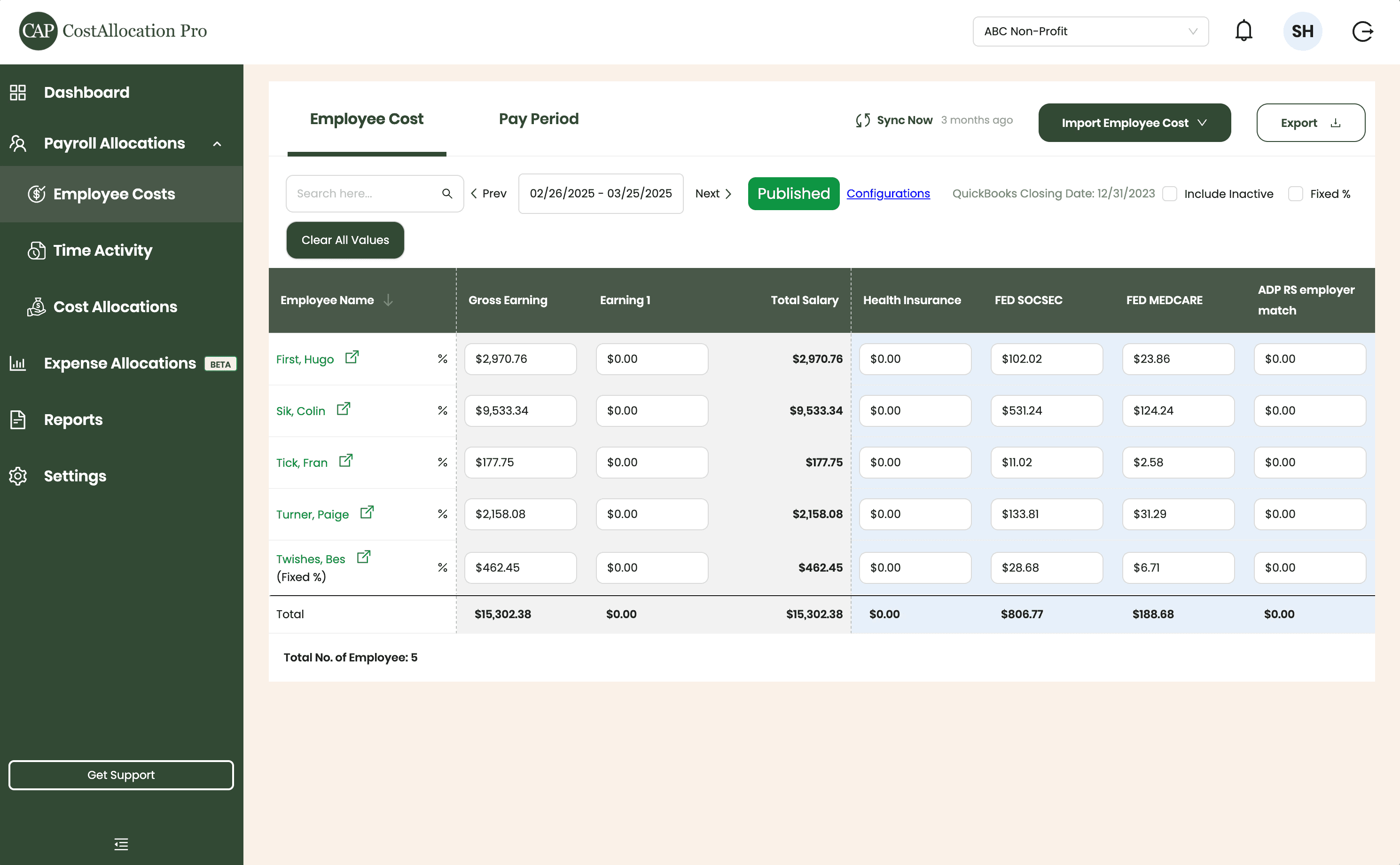
Employee Costs
Easily upload employee cost data from any payroll provider. Just import a .csv file from your payroll report, and we’ll handle the rest.
First, Hugo
$2,970.76
$350.00
$102.02
$23.86
Sik, Colin
$9,533.34
$450.00
$531.24
$124.24
Tick, Fran
$177.75
$500.00
$11.02
$2.58
Turner, Paige
2,158.08
$250.00
$133.81
$31.29
Twishes, Bes
$462.45
$175.00
$28.68
$6.71
Employee Name
Gross Salary
Health Insurance
Social Security
Medicare
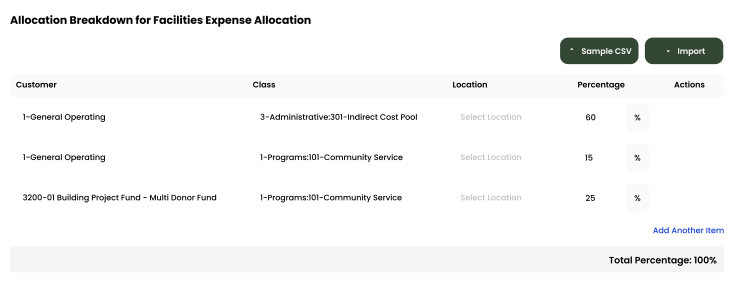
Expense Allocations
Apply your predefined allocation percentages and post to QuickBooks with a single click.
Time Activity
Sync employee time directly from QuickBooks, or import a .csv from any time-tracking system—whichever works best for you.
Employee
Customer
Hours
Turner, Paige
1-General Operating Fund
1:00
Twishes, Bes
GOLD Grant-BG12546347
8:00
First, Hugo
Big Grant
8:00
First, Hugo
Big Grant
4:00
First, Hugo
TN Grant (10/22-9/23)
2:00
Twishes, Bes
Public Health Workforce
Contract-#124578
6:00
Turner, Paige
1-General Operating Fund
1:00
Download Attachments
Filter and select transactions, export their attachments, and download everything neatly organized by vendor—no extra sorting required.
Automate Journal Entries
Import your employee time and CostAllocation Pro automatically calculates payroll allocations, creates the journal entry, and lets you publish directly to QuickBooks Online.

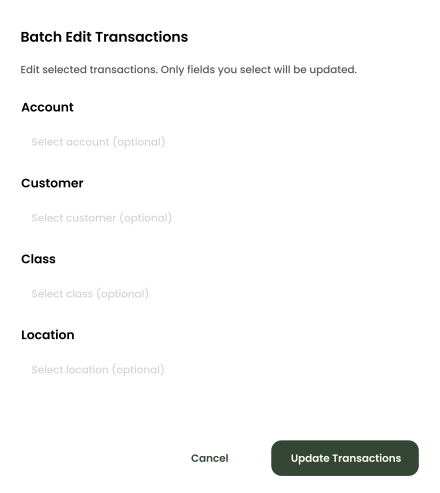
Batch Edit
Use custom filters to quickly find the transactions you need. Select any group of entries to reclassify accounts, customers, classes, or locations—and your updates sync instantly to QuickBooks Online.
construction companies
Automated Job Cost Allocation for QuickBooks Online
CostAllocation Pro connects directly to QuickBooks Online and automates the distribution of shared costs across jobs using the cost codes and allocation methodology you define — direct labor hours, contract value, equipment usage, or a custom basis. Equipment costs, supervision, yard overhead, general liability insurance — all allocated to the right jobs automatically every month, with no manual journal entries. Your project managers see accurate job cost data throughout the month. Your estimators can trust that historical job cost data reflects how costs were actually distributed, not how someone approximated it in a spreadsheet.
Overhead Allocated to the Right Jobs Automatically
Define your job cost allocation methodology once — by labor hours, contract value, or a custom basis. CostAllocation Pro distributes shared costs across jobs every month without manual calculation.
Reliable Job Cost History for Better Estimates
When overhead is allocated consistently across every job, your historical cost data becomes a dependable basis for future bids. Trust your numbers — because the methodology never drifts.
No more manual journal entries.
CostAllocation Pro works directly with QuickBooks Online — the system your team already uses. Once your allocation is complete, you can post the journal entry directly to QuickBooks Online.
construction companies
Accurate Job Cost History That Improves Every Bid
The real payoff of consistent job costing isn't just cleaner books — it's better estimates. When overhead is allocated the same way across every job, every month, your historical cost data becomes a reliable basis for future bids. You can see which project types carry more overhead burden, which crew configurations are most cost-efficient, and where your margins are actually being made or lost. CostAllocation Pro gives construction companies the job cost visibility that manual processes can't deliver — without replacing QuickBooks.
Contractors who rely on manual job costing are making estimating and margin decisions based on cost data they can't fully rely on — and often don't find out until after project closeout.
See how construction companies automate job cost allocation for QuickBooks Online — and get cost data they can actually use to bid and manage projects.
construction companies
Choose the best Plan that suites you
Monthly
Yearly
Save 20%

Standard
Essential finance tools for budgeting and expense tracking.
$50
$40
/month
Automate Journal Entries
Import Employee Costs from any Payroll Processor
Company Selector for Multiple QuickBooks Online accounts
Email Support
construction companies
Common questions with Clear answers
Can CostAllocation Pro allocate overhead across jobs and cost codes simultaneously?
Yes. CostAllocation Pro supports allocation across multiple dimensions. Currently, CostAllocation Pro can allocate labor costs across the customer and class dimension. The expense allocation feature can allocate across customer, class, and location simultaneously. You define the allocation bases and the software handles the distribution automatically.
What allocation bases can we use for distributing overhead across jobs?
Currently, CostAllocation Pro supports both labor hours or direct percentages. You can also use different bases for different cost groups.
How does job cost allocation work when our job mix changes month to month?
In CostAllocation Pro, you can calculate job cost allocations each month based on the bases you've defined. If those bases need to shift, you can adjust and then run your automated allocation.