construction companies
Close Your Construction Books Faster With Automated Monthly Job Costing
Month-end shouldn't mean a week of manually splitting overhead across active jobs. CostAllocation Pro automates monthly job cost allocation directly with QuickBooks Online — so your books close on time and your job margins reflect actual costs.
Trusted by




construction companies
Why Monthly Job Costing Is So Time-Consuming in Construction
Construction accounting has a monthly rhythm that most industries don't deal with: shared costs — equipment depreciation, yard expenses, supervision, insurance, small tools — have to be split across active jobs every single month based on that month's actual activity. The job mix changes. Labor hours shift between projects. Equipment moves from site to site. Every month, someone has to gather that activity data, update the allocation percentages, recalculate the splits, and post the journal entries — all before the books can close. In a busy month with a dozen active jobs, that process can take days. Many contractors don't know if they made or lost money on a job until after project closeout. CostAllocation Pro makes that whole process much simpler.
Powerful Features. Built To Save Time.
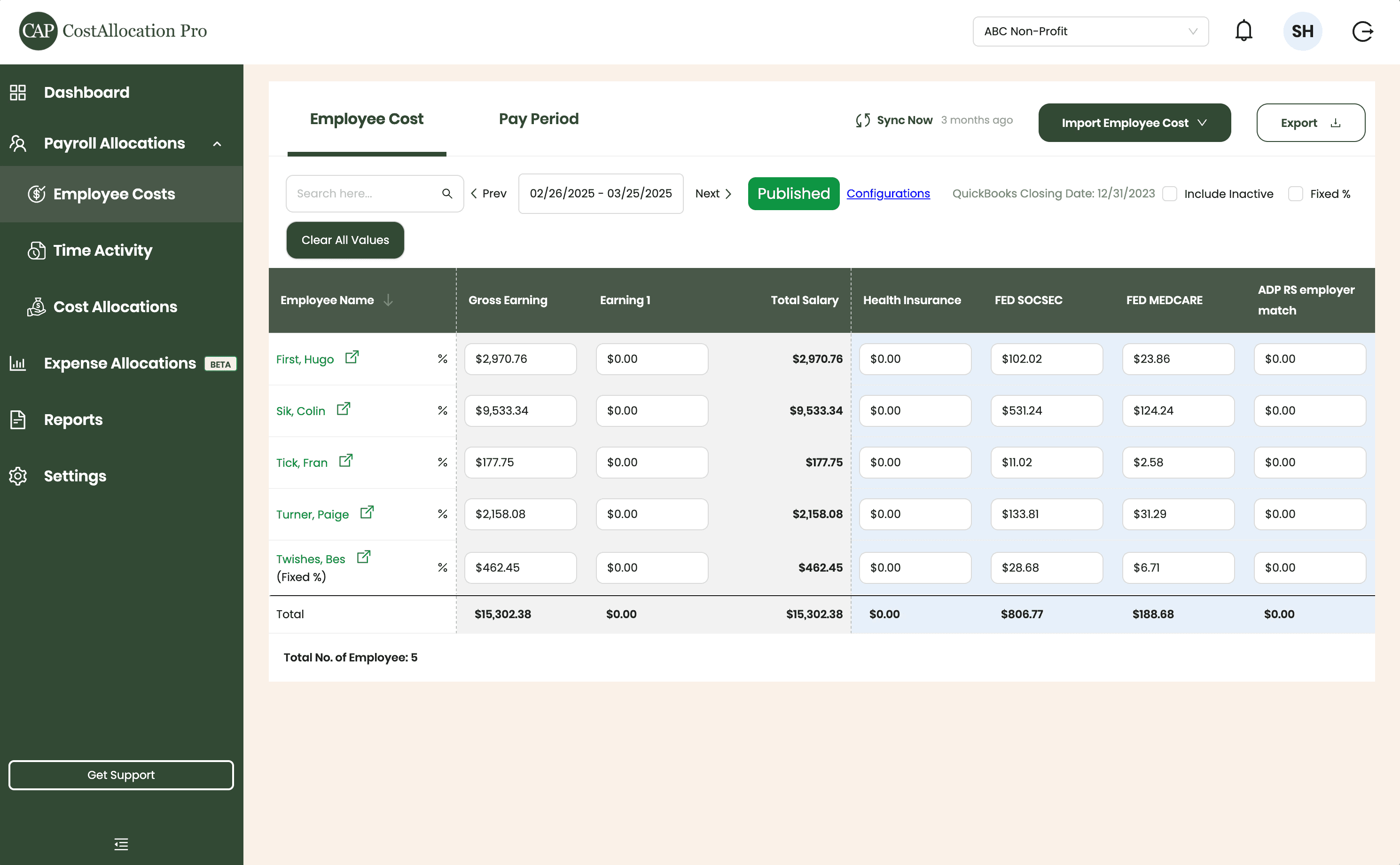
Employee Costs
Easily upload employee cost data from any payroll provider. Just import a .csv file from your payroll report, and we’ll handle the rest.
First, Hugo
$2,970.76
$350.00
$102.02
$23.86
Sik, Colin
$9,533.34
$450.00
$531.24
$124.24
Tick, Fran
$177.75
$500.00
$11.02
$2.58
Turner, Paige
2,158.08
$250.00
$133.81
$31.29
Twishes, Bes
$462.45
$175.00
$28.68
$6.71
Employee Name
Gross Salary
Health Insurance
Social Security
Medicare
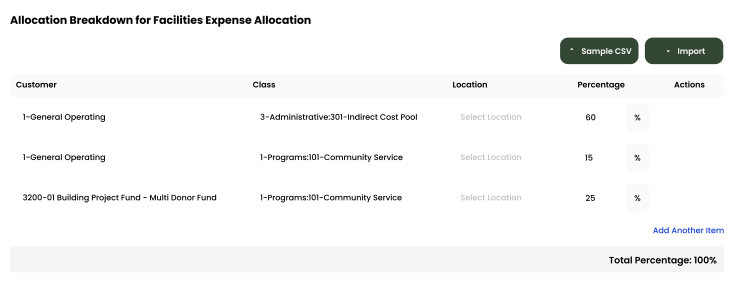
Expense Allocations
Apply your predefined allocation percentages and post to QuickBooks with a single click.
Time Activity
Sync employee time directly from QuickBooks, or import a .csv from any time-tracking system—whichever works best for you.
Employee
Customer
Hours
Turner, Paige
1-General Operating Fund
1:00
Twishes, Bes
GOLD Grant-BG12546347
8:00
First, Hugo
Big Grant
8:00
First, Hugo
Big Grant
4:00
First, Hugo
TN Grant (10/22-9/23)
2:00
Twishes, Bes
Public Health Workforce
Contract-#124578
6:00
Turner, Paige
1-General Operating Fund
1:00
Download Attachments
Filter and select transactions, export their attachments, and download everything neatly organized by vendor—no extra sorting required.
Automate Journal Entries
Import your employee time and CostAllocation Pro automatically calculates payroll allocations, creates the journal entry, and lets you publish directly to QuickBooks Online.

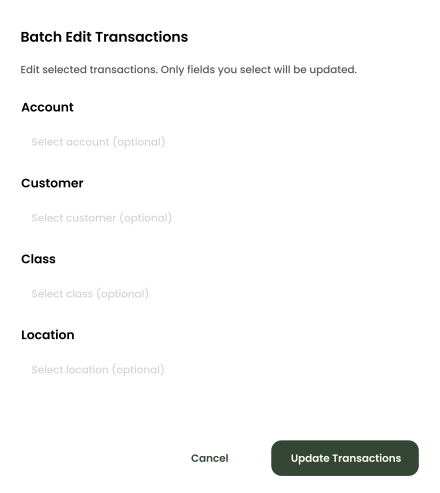
Batch Edit
Use custom filters to quickly find the transactions you need. Select any group of entries to reclassify accounts, customers, classes, or locations—and your updates sync instantly to QuickBooks Online.
construction companies
Monthly Job Cost Allocation That Adjusts to Your Project Mix
CostAllocation Pro connects to your QuickBooks Online account and automates monthly overhead allocation based on current job activity and the cost codes and allocation bases you define. The monthly allocation is determined based on your actual labor hours or percentages you define. Then you can automatically post the correct distribution of shared costs directly to your QuickBooks general ledger.
Job Cost Allocation That Adjusts to Your Project Mix
As labor hours shift and jobs open and close, CostAllocation Pro calculates your overhead distribution every month based on current activity — without manual reconfiguration.
Job Margins Your Project Managers Can Trust
Consistent monthly job cost allocation means your project managers see margin data that reflects how costs were actually distributed — not how someone approximated it at month-end under time pressure.
Close the Books Without the Month-End Scramble
Shared costs post to the right jobs automatically. Your accounting team reviews the allocation output instead of building it — and the books close on schedule.
construction companies
Accurate Job Margins Without the Month-End Marathon
Job margins are only meaningful if overhead is distributed correctly. When job cost allocation is manual and rushed, costs get spread unevenly — and your project managers end up making decisions based on margin data that doesn't reflect how the job is actually performing. CostAllocation Pro gives construction accounting teams the ability to close the month with confidence that every job's cost data reflects a consistent, correctly applied overhead distribution. Your project managers get reliable WIP data. Your estimators get better historical cost benchmarks. And your accounting team gets their time back.
Manual monthly job costing in construction takes days of accounting staff time and produces cost data that varies in reliability from month to month — leaving project managers to make decisions they can't fully trust.
See how construction companies are automating monthly job cost allocation inside QuickBooks Online and closing their books faster.
construction companies
Choose the best Plan that suites you
Monthly
Yearly
Save 20%

Standard
Essential finance tools for budgeting and expense tracking.
$50
$40
/month
Automate Journal Entries
Import Employee Costs from any Payroll Processor
Company Selector for Multiple QuickBooks Online accounts
Email Support
construction companies
Common questions with Clear answers
Can CostAllocation Pro handle job cost allocation across both active and partially complete jobs?
Yes. CostAllocation Pro allocates costs across all active jobs in your QuickBooks account based on the allocation bases you define. Jobs that are partially complete, recently opened, or in close-out are all included in the allocation run based on their current activity data.
What if some costs should only be allocated to certain job types or phases?
CostAllocation Pro supports targeted allocation rules — you can define specific cost pools that only distribute to certain job categories, divisions, or locations. For example, specialized equipment costs can be allocated only to the jobs that use that equipment type, while general overhead can be distributed more broadly.
How does month-end job costing work if some costs haven't been entered yet?
CostAllocation Pro allocates based on transactions in QuickBooks at the time you run the allocation. Most construction companies run a preliminary allocation early in the close process and a final allocation once all costs are posted. Both runs are fast — the preliminary run takes the same amount of time as the final.